显示标签为“MongoDB”的博文。显示所有博文

2015年2月4日星期三

MongoDB week4 Notes

In order to use index in MongoDB, we must give a leftmost set of the indexes. The order of the indexes matter.
db.students.ensureIndex( { student_id : 1 } )     -> create the index on student_id in increasing order
db.students.ensureIndex( { student_id : 1, class : -1 } )  -> create a compound index
db.system.indexes.find( )    -> find all the indexes in the current database, index default on _id field
db.students.getIndexes( )
db.students.dropIndex( { student_id : 1 } )  -> drop the created index
MongoDB allows to create a key on a field which is an array, the index is called multi-key index.
MongoDB allows to create a compound index with an array and a scale, but does not allow to array.
db.stuff.ensureIndex( { thing : 1 }, { unique : true } )  -> create unique index, each key can only appear once
db.stuff.ensureIndex( { thing : 1}, { unique : true, dropDups : true } )  -> drop the duplicates expect for one
sparse index, only create index on the document that has the specific field
In order to find which index to use for a query, MongoDB will experiment different indexes on real data in parallel to test which is optimal and memorize it
db.students.stats( )
Index Cardinality     
  • Regular     1 : 1
  • Sparse      <= documents
  • Multikey    > document ( index on each array elements )
Use hint( ) to manually tell MongoDB what index to use
ensureIndex( {“location” : “2d” } )  -> 2D geospatial index
find( { location : { $near : [x, y] } } )
db.places.find( { location : { $near : {
                                                          $geometry : {
                                                                 type : ‘Point’,
                                                                 coordinates : [x, y] },      
                                                          $maxDistance : 2000
                                              }
                           }
} )
db.sentences.ensureIndex( { ‘words’ : ‘text’ } ) -> support full text search
db.sentences.find( { $text : { $search : ‘dog moss’ } } )
use mongotop to find where does most time have been spent on
mongostat
idx miss -> how many times indexes are not in the memory when they are needed, an import factor

Shard: split up the large data into several mongod client as shards, use a mongos as a sever and let the application talk to mongos. It will use shard_key to issue which shards receive the query. The insert operation must contain the entire shard_key. For update and remove query, if shard_key is not given, mongos will broadcast the query to hall shards.

MongoDB week3 Notes

Always try to use embed data and pre-join the data, since there is no join function provided in mongoDB.
There is no guarantee in mongoDB for the consistence of the data, for example, the foreign key constraints. So pre-join the data to make it intact and consistence. 

One-to-one relationships
  • use true linking(“id”)
  • embed the document 
Things need to considerate
  • frequency of access 
  • size of items, growing
  • atomicity of data
One-to-many relationships
  • the best way is to use true linking ( the people living in a city ), when the “many” is large
  • if the data is few, then we can use embed documents ( the blog schema for comets ), when the “many” is few
Many-to-many relationships
  • the actual relationships are few-to-few, then we could embed an array of ids to link the two documents
  • another way is to use embedded documents, but this may not applicable in some situation, for example, in student-teacher relationship, we may insert a teacher into the system before he has any student
Multikey Indexes: index on a array, which makes embedding an array of links more efficiency to query many-to-many relations in MongoDB

Benefits of embedding
  • Improved read performance, reduce the seek latency since the document is stored sequentially on disk
  • One roundtrip to the DB

Tree representations
  • embed a list of children in the document
  • embed a list of ancestors in the document

Store large documents in MongoDB, larger than 16 MB: GridFS, break the large blobs into pieces to store in MongoDB. GridFS break the documents into two collections, one is called chunk collection and each document in it is 16MB, the other is called files collection, which describe the file put in the chunk collection. The documents in the chunk collection have a files_id associate with the files collection.

ODM: lays between application and driver, tell ODM how to handle the class and hand off objects to ODM,  then it will interact with the driver


2015年1月21日星期三

MongoDB week2 Notes

MongoDB’s CRUD operations exist as methods/functions in programming language APIs, not as a separated language.

db — current database
db.people.insert( ) — insert into collections
_id — the unique filed for all documents inserted into database, it is a primary key field, and it is immutable
The objectID is a global unique identifier, which is used for __id
db.people.findOne( ) — return randomly one document
db.people.findOne( ) || db.people.find( )
  • the first argument specific the criteria to match, like the WHERE clause
  • the second argument specific what field to return, like the SELECT clause
db.people.find( ) — find all documents in people collection
db.people.find( ).pretty( ) — change the format to show the result

db.people.find( { score : { $gt : 95 } } ) — query operator
db.people.find( { profession : { $exists : true } } ); — query on the structure of document
db.people.find( { name : { $type : 2 } } ); — query on the type of fields
db.people.find( { name : { $regex : “a” } } ); — regular expression matching on string
{ $or : [query1, query2, … , queryn] }
{ $and : [query1, query2, … , queryn] }
db.accounts.find( { favorites : “beer” } ) — query if an array contains the specific value, only check the top level and no recursion on the nested sub-documents.
db.accounts.find( { favorites : { $all : [ “beer”, “pretzels” ] } } ) — favorites contains all elements in the array, the order does not matter
db.accounts.find( { name : { $in : [ “xxx”, “yyy”] } } ) — the document which name is in the array, either xxx or yyy
db.users.find( { “email.work” : “xxxx” } ) — dot notation, allows to query for the embedded document

cursor.hasNext( ) — return true as long as there’s another document to visit on this cursor
cursor.next( ) — return next document to be visited
cursor.limit( 5 ) — limit the number of the document of the cursor, instruct the server to return specific number of document when cursor start to iterate
cursor.sort( { name : -1 } ) || cursor.skip( ) 
we could not modify the cursor once we have called hasNext( ) or next( ). limit, sort and skip are executed in server side not client side.
sort —> skip —> limit

db.scores.count( { xxx : yyy } ) — count the document
db.people.update( { name : “Smith” }, { name : “Tomas”, Salary : 50000 }) — the document which name is Smith would be replaced by the second argument which is a new document.
db.people.update( { name : “Smith” }, { $set : { name : “Tomas” } } ) — update the field only, if the field does not exist, it will be created
use $inc to increase the value of a specific field
db.people.update( { name : “Smith” }, { $unset : { professional : 1 } } ) — remove a field in a document
db.array.update( { xxx : yyy }, { $set : { “array.index” : zzz } } ) — use dot notation to specify the element in the array try to change
use $push to add an element into the array from the rightmost place
use $pop to remove the rightmost element int the array
use $pushAll to add append an array from the rightmost place
use $pull to remove an element from the array regardless of its position
use $pullAll to remove a list of element from the array
use $addToSet to treat the array as a set, if duplicates exist, it will do nothing
db.people.update( { }, { }, { upset : true } ) — insert a new document if the document does not exist
db.people.update( { }, { }, { multi : true} ) — update multiple documents
db.people.remove( { } ) — remove a document that matches the specific criteria

Nodejs

var MongoClient = require(‘mongodb’).MongoClient;
MongoClient.connect( ‘connect string here’, function(err db) { } )
db.collection( ‘collection name’ ).findOne( query, function(err, doc) { } )
db.collection( ‘collection name’ ).find( query ).toArray(function( err, docs ) { } )
var cursor = db.collection( ‘collection name’ ).find( query );
cursor.each( function( err, doc ) { } ) 
.find( ) will create a cursor object, only when the cursor call .each( ) or .toArray( ), it starts to retrieves data from database, the database will not return the entire result but a batch of the result
db.collection( ‘collection name’ ).find( query, projection )
cursor.sort( [ [ ‘grade’ , 1 ], [ ‘student’ , -1 ] ] ) —> use array in order to avoid the rearrange of the elements
db.collection( ‘collection name’ ).insert( doc, function( err, inserted ) { } )
db.collection( ‘collection name’ ).update( query, operator, options, function( err, updated ) { } )
we could not mix $operators with normal fields
db.collection( ‘collection name’ ).save( doc, function( err, saved ) { } ) — check to see if the doc exist (_id), if not, then a new document would be inserted otherwise, replacement would be done
findAndModify( query, sort, operator, option, callback ) — atomically find and returns the document, no two client would conflict here on the document

Java 

The parameter of all method is DBObject, which is used to represent a document. — BasicDBObject
MongoClient client = new MongoClient( )
DB courseDB = client.getDB(“xxx”)


DBCollection collection = courseDB.getCollection(“xxx”)

MongoDB week1 Notes

MongoDB is a non-relational data store for JSON documents.
JSON document is like: { key : field }. And it could have some hierarchical. 
MongoDB is also schemaless.
MongoDB tries to maintain scalability and  performance as well as provide much functionality. 
  • MongoDB does not support joins
  • MongoDB also does not support transactions
MongoDB continuos to listen for connections and expect BSON data, there is some protocol to explain this kind of data. A mongoDB driver is a library in some specific language to communicate with mongoDB.

app.get(url, function (req, res) {}) —> tell the express how to response to url with get method.
app.get(‘*’, function (req, res) {}) —> ‘*’ is a wildcard matching and anything not handled above would be handled here.
var cons = require(‘consolidate’)
app.engine(‘html’, cons.swig) —> set the template engine for express.
app.set(‘view engine’, ‘html’)
app.set(‘views’, __dirname + ‘/views’)


There are typically two kinds of things in JSON, arrays [   ] and dictionaries {  }, which is associative maps.

2015年1月2日星期五

MongoDB Notes Final

Aggregation Introduction

Aggregations are operations that process data records and return computed results.

Aggregation Pipelines
  • Documents enter a multi-stage pipelines that transforms the documents into an aggregated result.
  • consist of stages.
  • some stages take a aggregation expression as input.

Map-Reduce
  • Map, Reduce, Finalize.
  • use custom JavaScript functions to map values to key.

Single Purpose Aggregation Operations
  • returning a count of matching documents
    • collection.count( )
  • returning the distinct values for a field
    • collection.distinct( )

  • grouping data based on the values of a field
    • collection.group( )


Aggregation Pipeline on Sharded Collections
  • The pipeline is split into two parts
    • The first is run on each shard, or exclude some shards through shard key
    • The second is run on primary shard, which collect the cursor from each shard, then forward the final result to mongos

Map-Reduce Example
  • Define the map function to process each input document

  • Define the corresponding function with two arguments

  • Perform the map-reduce on all documents in the orders collection using the map function and reduce function


Replication Introduction

Replication is the process of synchronizing data across multiple severs.
Replication provides redundancy and increases data availability. Also allows you to recover from hardware failure and service interruption. 

A replica set is a group of mongod instances that host the same data. One mongod, called the primary, receives all write operations. All other instances, called secondaries, apply operations form the primary to have the same data. The primary logs all operations to oplog. Only primary could receive write operations, read operations could be received by all members.

The secondaries apply the oplog to themselves. If the primary is unavailable, one of the secondaries would be elected to the new primary. The secondary that receives majority of the votes.

An arbiter could be added to break the draw during the election when there are even number of secondaries. The arbiter does not hold any data and is only used for election. 

An arbiter is always an arbiter, a primary could become a secondary, and a secondary could become a primary.

Each set has at most 12 members and in each election, at most 7 members could vote.

Priority 0 member is a secondary that could not become a primary, could not trigger elections. It could function as a standby.
A hidden member maintains a copy of the primary’s data and invisible to the client applications. It must be priority 0 and could not be the primary.

Delayed member contains copies of a replica sets’ data. It reflects an earlier or delayed state of the set. They must be priority 0 and must be a hidden member.

Architecture 
  • Three member replica sets
    • The minimum architecture of a replica set
  • Replica sets with four or more members
    • ensure the sets have odd number of voting members
  • Geographically distributed replica sets

Failover
Heartbeats: Replica set members send heartbeats(pings) to each other every two seconds. If it does not return within 10 seconds, then this member would mark it as inaccessible.

Members prefer to vote members with high priority.

Optime: the timestamp of the last operation that a member applied form the oplog. A replica set member could not become a primary unless it has the highest optime of any visible member in the set.

A replica set member can not become primary unless it can connect a majority of the members in the set. In a three members architecture, a secondary could not be a primary when the other two are done since it could not connect to a majority number of the members in the set. Also when the two secondaries are done, the primary would down step to a secondary.

Read Preference
  • primary
  • primaryPreferred
  • secondary
  • secondaryPreferred
  • nearest

The oplog is a special capped collection that keeps a rolling record of all operations that modify the data stored in your database. All replica set maintain a copy of oplog. Any member can import oplog entries from any other member.

Data Synchronization
  • Initial Sync: when a member has no data
    • Clones all data.
    • Applies all changes to the data set.
    • Builds all indexes on all collections.
  • Replication: continuously after initial sync


2014年12月30日星期二

MongoDB Notes Part IV


Data Modeling Introduction

MongoDB’s collections do not enforce document structure.

Tools for represent the relationships:
  • References
    • store the relationships between data by including links or references from one document to another.
    • normalized data models.

  • Embedded Data
    • store the relationships between data by storing related data in a single document structure.
    • denormalized data model.
    • could guarantee atomicity since all data are in a single document.

In general, use embedded data models when:
  • you have “contains” relationships between entities.
  • you have one-to-many relationships between entities.

Embedding provides better performance for read operations, as well as the ability to request and retrieve related data in a single database operation. However, this may lead to situations where documents grow after creation.

To interact with the embedded document, use “dot notation”.

In general, use references when:
  • when embedding would cause duplicates and would not bring any advantages.
  • to represent more complex many-to-many relationships.
  • to model large hierarchical data sets.

GridFS stores files in two collections:
  • chunks stores the binary chunks.
  • files stores the file’s metadata. 

Model Tree Structures
  • use Parent References, store the reference to the parent category in the field parent.
  • use Child References, store all the reference of the child category in the field children.
  • use Array of Ancestors, provides a fast and efficient way to find the descendants and ancestors of a node by creating an index on the ancestors field.
  • use Materialized Paths, store the path in the field path, the path string uses the comma a a delimiter.

  • use Nested Sets, best for static trees that do not change.

To support keyword search, contains a field of the keywords, and create a multi-key index on this field.

Index Introduction

Index types
  • Single Field Indexes
    • A default index is create on the _id field.
    • The field could be the embedded field or a subdocument.
  • Compound Indexes
    • The order of the fields matter.
    • Supports queries on any prefix of the index fields.
  • Multikey Indexes
    • to create an index on an array, adds index items for each element in the array.
    • the index of a shard key can not be multi key index.

  • Geospatial Indexes
  • Text Indexes
    • to support text search of string content in documents of a collection

  • TTL indexes
    • special indexex that MongoDB can use to automatically remove documents from a collection after a certain amount of time.

  • Unique indexes
    • cause MongoDB to reject all documents that contain a duplicate value for the indexed field.

  • Sparse indexes
    • only contain entries for documents that have the indexed field.

Remove a Specific Index


Modify an Index
  • First drop the index and then build the index

List all Indexes on a Collection

2014年12月29日星期一

MongoDB Notes Part III

Sharding Introduction 

Sharding is a method of storing data across multiple machines. MongoDB uses sharding to support large data set and high throughput operations.

Two approaches to address the scales
  • vertical scaling
    • adds more CPU and storage resources to increase capacity.
      • As a result there is a practical maximum capacity for vertical scaling.
  • sharding (horizontal scaling)
    • divides data set and distributes the data over multiple servers, or shards.
      • sharding reduces the number of operations each shard handles.
      • sharding reduces the amount of data that each serve needs to store.

Sharding in MongoDB


Sharded cluster has three components: 
  • Shards
    • store the data, each shard is a replica set or a single mongod instance.
  • Query Routers
    • interface with client and direct operation to appropriate shard or shards.
  • Config servers
    • store the cluster’s metadata, which contains the mapping of clusters’ data to shards. There are exactly three config servers.
    • uses two phase commit to confirm immediate consistency and reliability.
    • clusters become inoperable without the cluster metadata, always ensure config servers are available.

Data Partitioning

Sharding partitions a collection’s data by the shard key.
A shard key is either an indexed field or an indexed compound field that exists in every document in the collection. MongoDB divides the shard key values into chunks and distributes them evenly on shards. Shard keys are immutable and cannot be changed after insertion.

Range Based Sharding
  • divides the data set into ranges determined by the shard key values.
  • good for range queries, but the data might not evenly distributed.

Hash Based Sharding
  • computes the hash of a field’s value and then uses the hashes to create chunks.
  • data is distributed more evenly, but the efficiency of range queries goes down.

Maintaining a Balanced Data Distribution

Splitting: A background process that keeps chunk from growing too large. When a chunk grows beyond a specified chunk size, MongoDB splits the chunk in half.

Balancing: A background process that migrate chunks.
  • First, the destination shard is sent all the documents in the chunk of origin shard.
  • Second, the destination shard captures and applies all changes to the data during the migration.
  • Finally, the metadata regarding the location of the chunk on config server are updated.
  • MongoDB removes all chunks on origin shard after the migration is successful.

Broadcast Operations and Target Operations


  • broadcast queries to all shards unless the mongos can determine the single or subset shards to process.
  • The remove( ) is always broadcast.
  • All insert( ) operation targets to one shard.

2014年12月28日星期日

MongoDB Notes Part II

Insert Documents

Insert a document into a collection.

MongoDB provides a Bulk( ) API that you can use to perform multiple write operations in bulk.
  • initialize the operation builder
  • add insert operation
  • execute

Query Documents

Select all document in a collection.


Specify equality condition
  • use { <field> : <value> }


Specify conditions using query operators 


Specify AND condition


Specify OR condition


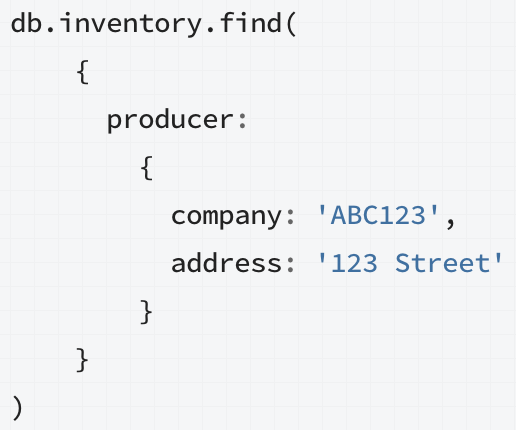
Exact Match on the Embedded Document


Equality Match on Fields within an Embedded Document


Exact Match on an Array
  • Match every element in the array, including the order


Match an Array Element
  • The array contains at least one element with the specified value.


Match a Specify Element of an Array
  • Match at a particular position in the array


Single Element Satisfies the Criteria
  • Use $elemMatch to specify multiple criteria on the elements of an array such that at least one element in the array satisfies all criteria.


Combination of Elements Satisfies the Criteria


Matching a Field in the Embedded Document Using the Array Index


Match a Field Without Specifying Array Index
  • Select the document where the ‘memos’ field contains an array that at least one embedded document contains the field ‘by’ with ‘shipping’. 

Single Element Satisfies the Criteria


Combination of Elements Satisfies the Criteria


Modify Documents

Use update operators to change field values.


Update an embedded field.
  • Use dot notation

Update multiple documents
  • Use the multi option in update


Replace a document.


Specify upsert: true for the update replacement operation.
Specify uperst: true for the update specific fields operation.
  • If no document matches, a new document would be inserted.

Remove Documents

Remove All Documents


Remove Documents that Match a Condition


Remove a Single Document that Matches a Condition


Limit Fields to Return from a Query


You can not combine inclusion and exclusion semantics in a single projection with the exception of _id.

Iterate a Cursor


Use toArray( ) to convert the cursor into an array. It will consume all the cursor. 

Query with Index


Two Phase Commit

Create an Auto-Incrementing Sequence Field


  • Use Counters Collection
    • use a collection to hold the last id, use a function to get and update the id from this counter collection.
  • Optimistic Loop
    • calculates the incremented _id value and attempts to insert a document with the calculated _id until the insertion is successful.
All pictures are from http://docs.mongodb.org/manual/